
Ripl: Social Media Marketing
Ripl Inc.Art & Design
4.44.66K Reviews
- Version
- 4.0.1004
- Installs
- 1.00M
- Age Rating
- Teen
Screenshots
Our Review of Ripl: Social Media Marketing
 Analysis by Appyee
When I choose a tool for social content, I first ask whether it helps me get from an idea to a finished post without turning a quick task into a design project. That is where Ripl makes its case: it is an art-and-design app from Ripl Inc. aimed at people who want promotional visuals and short-form content without building every asset from scratch. I would consider it for a small business, a community group, or a solo creator who needs a steady stream of polished posts more than a deeply customizable design system.
The decision is less about whether a template can look attractive and more about whether its workflow suits the way you publish. If you mainly need to make a sale announcement, event graphic, or brief social video, a focused creator can be more practical than opening a general design tool and starting with a blank canvas. If you need precise layout control or a distinctive campaign identity across many formats, a broader design app may be the better place to work.
Choose it for speed, not unlimited control
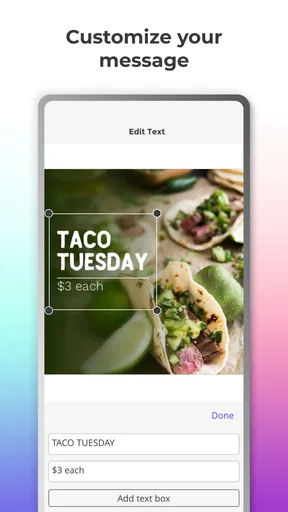
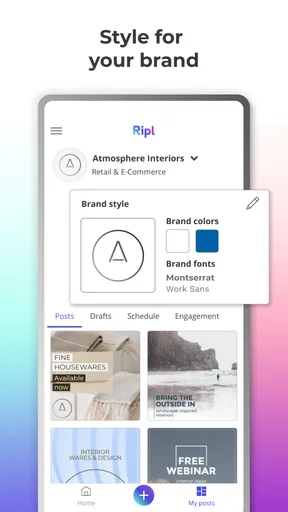
Ripl’s strength is the short route from a basic message to something ready to share. Its template-led approach gives people who are not designers a useful starting point, and changing colors, fonts, and images can help bring a design closer to a brand’s look. I would still treat the template as a framework rather than a finished strategy: the choice of image, the clarity of the offer, and the amount of text all determine whether the result feels personal or generic.
A practical workflow is to decide on the single action you want a viewer to take before choosing a design. For a weekend promotion, that might be visiting a shop; for a class, it could be signing up. Keeping the message focused makes it easier to select a fitting template and avoid squeezing too much copy into a visual. I would also prepare a small set of brand colors and a few usable photos beforehand, so creating another post does not become a search through an entire camera roll.
Where the publishing workflow helps
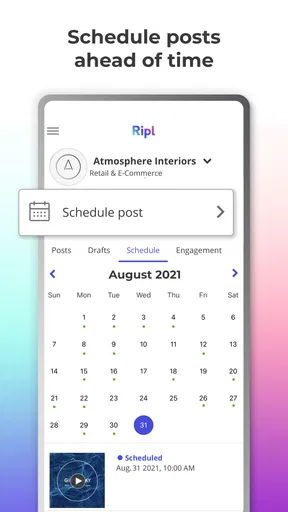
Planning posts in advance is useful when your workday does not leave room to stop and publish every time an idea comes up. Scheduling can help a small team prepare a week’s announcements in one sitting, then spend the rest of the week on customers or the work being promoted. The appeal is consistency and saved attention, not a guarantee that a post will reach more people. I would still check that the timing and message make sense for the audience rather than assuming automation can make that decision for me.
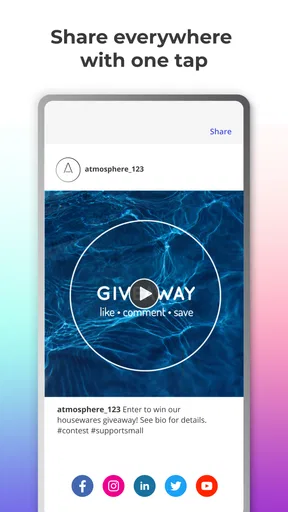
Sharing the same creation across several social channels can also reduce repetitive work, but I would review each version before sending it everywhere. A square graphic or short video may not suit every platform’s presentation, and wording that feels natural in one place can look out of place in another. When a post matters, I prefer to make small edits for each audience instead of treating cross-posting as a substitute for adapting the content.
Getting Started with Ripl
First things first, downloading Ripl is a breeze. Available for both Android and iOS, it’s just a tap away on your respective app store. Once it’s on your device, setting up your account is straightforward. You can sign up with your email or just link your Facebook account. Easy peasy!
As soon as you’re in, you’re greeted with a clean and intuitive interface. Everything is laid out in a way that makes sense, so even if you’re not a tech wizard, you won’t feel lost. The app guides you through creating your first post, which is a nice touch for beginners.
For a realistic day-to-day example, imagine a café owner who wants to promote a new seasonal drink. I would create one clear image or video, keep the offer and essential details easy to read, and prepare the post ahead of a busy shift. After publishing, I would note whether people responded to the item and use that observation to shape the next promotion. This is a modest, repeatable workflow; it does not require a full marketing department, but it does require someone to choose the message and respond to customers.
Before committing to a routine, I would make one sample post and check the whole process: choosing a template, adjusting the design, and getting the finished piece where it needs to go. That small test reveals whether the app’s editing rhythm feels comfortable on your phone and whether the available starting points suit your brand. It is also a sensible way to see how much time you save compared with making a graphic manually.
Features That Stand Out
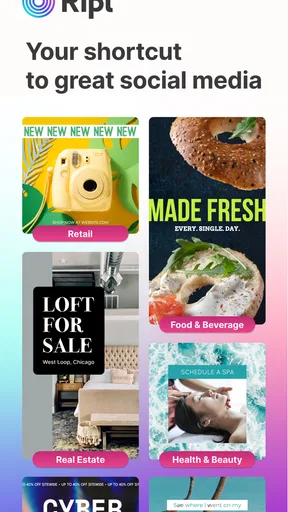
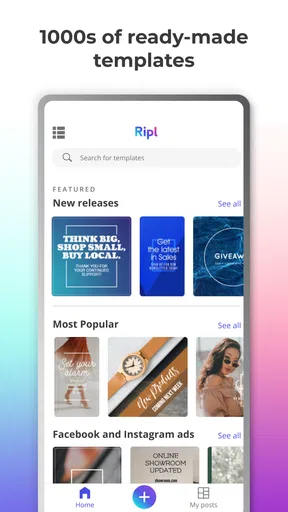
Now, let’s dive into what makes this app a must-have for anyone serious about social media marketing. The first thing that caught my eye was the extensive library of templates. Whether you’re promoting a sale, announcing an event, or just sharing some motivational quotes, there’s a template for that. And the best part? They’re all customizable!
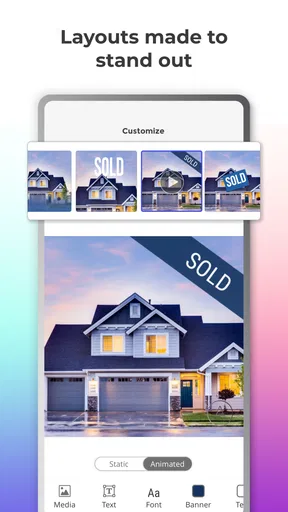
You can tweak colors, fonts, and images to match your brand’s vibe. Trust me, this feature alone can save you countless hours. No need to start from scratch every time you want to post something fresh.
My useful tip here is to think in reusable themes rather than designing each promotion as a one-off. A business might settle on a consistent color treatment and a familiar style for weekly offers, while changing the photo and headline. That can make posts feel connected even when the underlying templates differ. The trade-off is that a repeated look can become predictable, so I would reserve a different visual approach for major announcements and watch for signs that the regular format is no longer catching attention.
Ripl is also positioned for more than a single static social graphic: its creative uses include stories, video ads, flyers, promotional videos, and slideshows. That range is helpful when one campaign needs a few related pieces, but I would not assume every format should share identical wording. A flyer may need practical details, while a story or short promotional video benefits from a simpler message that can be understood quickly. Planning those variations before opening the editor can prevent a rushed, awkward resize or a crowded design.
Another killer feature is the ability to schedule posts. You can plan your week (or month) without having to scramble every day. Set it and forget it! Ripl posts for you at the optimal times, so you’ll never miss a chance to engage your audience.
I would use scheduling as a reminder and planning aid, not as a reason to stop paying attention. A time-sensitive promotion should be checked if circumstances change, and a scheduled post can feel tone-deaf if it goes out during an unexpected disruption. A quick review of the queue before the day starts is a low-effort safeguard. It also helps me avoid filling a calendar just for the sake of posting; a smaller number of useful updates is better than a stream of content with no clear purpose.
Create, Share, Grow
Ripl shines when it comes to sharing your creations. With one tap, you can blast your content across multiple platforms like Facebook, Instagram, Twitter, and LinkedIn. This is a game-changer for small business owners who need to manage multiple accounts without spending all day online.
The app also provides analytics, offering insights into what works and what doesn’t. You can track engagement, see which posts are getting the most love, and adjust your strategy accordingly. It’s like having a marketing consultant in your pocket.
I would read those insights as clues rather than verdicts. A post can receive a different response because of its subject, timing, or audience, so one result is not enough to justify changing an entire content plan. Comparing similar promotions over time is more useful: keep the offer and general format reasonably consistent, then notice which image or phrasing seems to invite a response. That kind of simple observation is practical for a small operation, even if it is not a substitute for a more detailed analytics workflow.
One question people often have is whether a dedicated social creator can replace a general-purpose graphics editor. For quick promotional work, it may reduce the number of steps between choosing a design and publishing it. For detailed illustration, precise brand systems, or layouts that need extensive control, I would use a tool built for that kind of design and bring the finished assets into the social workflow afterward. Ripl’s value is convenience within its intended lane, not being the best answer for every visual task.
It is free to install, which makes it easy to try before deciding whether it belongs in a regular routine. The app is rated for Teen audiences, and it has an average rating of 4.4 from around 14,000 ratings, with over one million installs. It has been available since January 23, 2017, and version 4.0.1001 requires Android 8.0 or later. In-app purchases range from $9.99 to $299.99 per item, so I would check the purchase options in the app before relying on any paid capability. Those prices make it especially important to judge the free experience against the amount of work you expect to do, rather than assuming every useful workflow will be included at no cost.
Room for Improvement?
While Ripl is fantastic, it’s not without its quirks. Occasionally, the app can be a bit slow when loading templates or exporting videos. It’s not a deal-breaker, but something to keep in mind if you’re in a rush.
That friction matters most when a post is tied to a deadline. I would avoid leaving an important export until the last few minutes before an event or promotion; prepare it earlier, check the finished file, and keep the final caption ready separately. This is a simple buffer, but it makes a slow load less stressful. If you regularly produce complex visual campaigns under tight deadlines, a desktop design workflow may offer a more comfortable environment than doing everything on a phone.
Also, while the templates are great, more variety would be welcome. After a while, you might feel like you’re seeing the same ones over and over. A little more diversity could go a long way in keeping things fresh.
That repetition is a reason to be selective, not to abandon templates altogether. I would change the photo, headline hierarchy, or color treatment when the same design starts to feel familiar, and avoid using a template just because it is convenient. If a brand depends on a very distinctive visual identity, template-based work may be best for routine notices while a designer or more flexible editor handles flagship campaign material. That division keeps everyday content manageable without asking a template library to solve a branding problem it was not designed to solve.
There is also a real difference between making a post and running a complete social presence. A design-and-publishing app can help with the content side, but someone still needs to decide what is worth sharing, check comments, answer customers, and make sure offers remain accurate. I would skip Ripl if I wanted a tool to develop a marketing strategy for me or if my main task were managing conversations rather than creating promotional visuals. In those cases, a planning, inbox, or specialist design tool may be a better fit, depending on the actual bottleneck.
Final Thoughts
All in all, Ripl is a solid choice for anyone looking to elevate their social media marketing. It’s user-friendly, packed with features, and versatile enough for various needs. Whether you’re a seasoned marketer or just starting out, this app can be your secret weapon.
My recommendation is clearest for people who make recurring announcements and want an approachable way to turn them into branded social content. It is less compelling for someone who posts rarely, needs fine-grained design control, or expects automation and analytics to replace judgment. Before spending on in-app purchases, I would build a few real posts, test the formats I actually use, and decide whether the saved effort is worth the cost for my own routine.
So, if you’re ready to take your social media presence from "meh" to "wow," give Ripl a shot. It’s like having a marketing team at your fingertips, minus the hefty price tag. Happy posting!
Verdict
Strengths of Ripl: Social Media Marketing
- User-friendly interface for beginners.
- Wide variety of templates available.
- Integrates with major social platforms.
- Customizable brand settings.
- Real-time analytics feature.
Limitations of Ripl: Social Media Marketing
- Limited free version capabilities.
- Occasional app performance issues.
- Subscription can be pricey.
- Requires internet for full functionality.
- No direct customer support chat.
Similar Picks in This Category
View All
Canva: AI Photo & Video Editor
Canva4.8

PENUP – Drawing-sharing SNS
Samsung Electronics Co., Ltd.4.5

Crafto
Kutumb App4.6

Sketchbook
Sketchbook4.1

ibis Paint X
ibis inc.4.5

Adobe Express: AI Photo, Video
Adobe4.6
Frequently Asked Questions
What is Ripl: Social Media Marketing used for?
Ripl is designed to help businesses and individuals create professional social media content with ease. It provides tools for creating eye-catching videos and graphics, scheduling posts, and tracking engagement. This app is ideal for those looking to enhance their online presence without needing extensive design skills.
Do I need design experience to use Ripl effectively?
No, Ripl is user-friendly and caters to all skill levels. It offers a variety of templates and customization options that allow users to create professional-looking content. The intuitive interface makes it easy to navigate, ensuring that even beginners can produce high-quality social media posts.
Is Ripl suitable for all types of businesses?
Yes, Ripl is versatile and can be used by businesses of all sizes and industries. Whether you're a small business owner, a marketer, or a freelancer, Ripl provides tools to create tailored content that aligns with your brand and audience, helping you to effectively engage and grow your social media presence.
Can I schedule posts using Ripl?
Yes, Ripl includes a scheduling feature that allows you to plan and automate your social media posts across various platforms. This is particularly useful for maintaining a consistent posting schedule, saving time, and ensuring that your audience receives content at optimal times.
Does Ripl offer analytics to track social media performance?
Ripl provides analytics tools to help you track the performance of your social media posts. You can monitor engagement metrics such as likes, shares, and comments, allowing you to adjust your strategy based on what resonates with your audience, ultimately improving your social media marketing efforts.
